
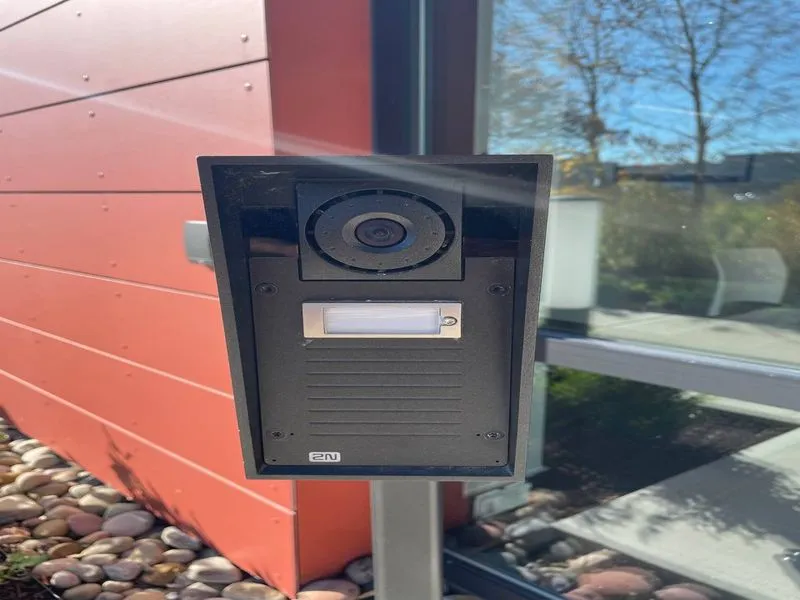
Every week somewhere in New Hampshire a buzzer panel fails. A vestibule wire corrodes, the panel takes one punch too many, or the in-unit handsets stop ringing — and complaints start. Callers can’t get in, delivery drivers leave without the package, tenants prop the front door, and the owner is pricing handsets for a system nobody manufactures anymore. This guide is for New Hampshire multifamily owners deciding what to install next, and it turns on one decision that does most of the work: should tenants answer on their cell phones, or on in-unit hardware?
This page covers intercoms for small apartment buildings and mixed-use properties — roughly 4 to 50 units. For offices and small businesses, see our intercom systems service page instead.
Two Approaches to a 4–50 Unit Building
For buildings this size, two approaches cover nearly every situation:
- Smartphone-based, app-to-app systems (Aiphone IX/IXG, 2N) — tenants answer on their cell phones and release the door from anywhere.
- Handset-free in-unit hardware — simple wall equipment with no monitor; the panel dials a landline or cell number in real time.
A third approach — a video monitor in every unit — still has a place, but a narrow one.
Option 1: Smartphone-Based, App-to-App (Aiphone IX/IXG, 2N)
Here the tenant’s phone is the intercom. A visitor taps the tenant’s name on the vestibule panel, the system calls the tenant’s cell through the app, and the tenant talks, sees live video of the door, and releases it from anywhere — the grocery store, the office, the couch.
What the tenant needs: nothing in the unit. No handset, no monitor, no riser wiring to the apartment. A move-out takes nothing with it; the next tenant registers the app fresh.
The trade-off: tenants install an app and register. In a building full of tenants who refuse to, this approach fights them — which is exactly why option 2 exists.
Option 2: Handset-Free In-Unit Hardware (Dials a Landline or Cell)
The tenant’s wall unit has no monitor at all. When a visitor dials the unit, the panel places a real phone call — to a POTS line or the tenant’s cell — and the tenant simply answers the phone and presses a key to release the door.
What the tenant needs: to answer a phone call. Nothing to install, no account. It’s the closest replacement for how old buzzer systems were always used: ring, talk, buzz in.
The trade-off: the panel dials only pre-programmed numbers. No app, no tenant-side video, and no reaching a tenant who isn’t near a phone.
Smartphone vs. Handset-Free at a Glance
| Factor | Smartphone-based (Aiphone IX/IXG, 2N) | Handset-free in-unit hardware |
|---|---|---|
| Tenant hardware | None — any smartphone works | Wall unit per unit, no monitor |
| Answer from anywhere | Yes | Only if the dialed phone is answered |
| Video at the door | Yes — at the panel and in the app | Door-station video only |
| Building network | Network drop and PoE at the panel | POTS per unit or built-in cellular |
| Tenant onboarding | App install + registration | Just answer the phone |
| Move-out/turnover | App re-registration | Rewire or re-program the unit |
One nuance: in both options the door station at the vestibule can have a camera — visitors are on video either way. What differs is whether the tenant’s side is an app on a phone or a wall unit without a monitor.
What About a Monitor in Every Unit?
A video monitor in every apartment is still the right answer where many tenants don’t carry cell phones, or where residents — often elderly tenants — expect hardware in the unit. Both Aiphone and 2N make solid monitor-based systems, and Arcomm installs them where a building calls for them. For most 4–50 unit buildings, though, per-unit monitors multiply cost by unit count, can’t be answered from outside the apartment, and add one more wall device to maintain.
What the Smartphone Approach Looks Like on an NH Building
The building needs three things: an outdoor-rated door station with camera and directory, sized to the unit count; a door release (electric strike or maglock) with a request-to-exit device inside the vestibule; and a network connection to the panel, usually PoE. For option 2, the panel instead needs a POTS or cellular dial-out path.
Tenant onboarding: with Aiphone, tenants install the MyTouchAiphone app; with 2N, the 2N mobile app with the panel’s directory managing credentials. Visitors ring, tenants see live video, tenants tap release. Tenants who never install the app aren’t stranded — the panel can dial their cell as a regular voice call, and they press a key to let the caller in.
A practical NH scenario: a tenant in the checkout line at Market Basket gets a ring from the vestibule, answers from line, sees who it is, and taps release. The visit happens, the package gets delivered, nobody had to be home. The same release works from anywhere with LTE.
What it costs: Arcomm quotes each building individually — the honest variables are riser condition, unit count, strike type, whether a network drop already reaches the vestibule, and how the directory gets wired. A typical quote lines out the door station, strike/REX (reuse vs. new), the PoE run, labor, and optional fob/card readers on amenity doors or integration with the building’s access control. We won’t publish “average per-unit” prices, because published averages rarely match a real New Hampshire building — a walkthrough quote beats a ballpark that’s wrong.
The phone line question: handset-free buildings that dial cell numbers keep working no matter what happens to copper. But if your current system dials in-unit handsets over individual POTS pairs, that ground is shrinking: with the 2026 Frontier–Iberdrola deal, remaining New England copper customers migrate to fiber over roughly the next 18 months, and buzzer-grade pairs retire with everything else. We covered what that means for alarm communicators in our POTS replacement post — the same clock is running on intercom dial-out pairs. This is the year to move to IP at the door, not re-jacket copper.
Security Benefits Beyond Convenience
Owners who switch to app-based entry notice behavior change before hardware:
- No more propped doors. Tenants release from anywhere, so there’s no reason to wedge the vestibule open.
- A camera at the door. Tenants see who they’re letting in before release, and entries are logged.
- No handset repair churn. Nothing in the unit to break; turnovers become an app re-registration.
- Cleaner delivery flow. Tenants let couriers in from work; the taped “leave it by the door” notes disappear.
Intercoms are one layer of a whole-building approach. Owners commonly pair them with access control on amenity doors — trash rooms, laundry, locker rooms — and with camera coverage at approaches and parking. The same network that runs the intercom can carry the cameras.
How to Decide in Five Questions
- Do your tenants use smartphones? Nearly all do → smartphone-based. A meaningful share don’t → handset-free, dialing cells.
- Is the owner off-site? App-based entry lets you answer visitors yourself from anywhere — you become the fallback.
- Does the riser run POTS per unit? Don’t re-jacket copper in 2026. Move to IP at the door, or at minimum switch dial-out to cell numbers.
- Do you want tenant-side video? Yes → smartphone-based; live video shows in the app.
- Do many tenants expect in-unit hardware? Monitor-based systems are still available where a building calls for them.
Common Questions From NH Owners
Will this work with our old wiring? Mostly, yes. The door station needs one network/PoE run to the vestibule; much of the existing riser stays in place, with voice pairs re-terminated as needed — routine low-voltage work Arcomm does as part of the job.
Can tenants still get in with a fob or card? Yes. The door station handles visitors; tenants use fobs or cards for their own entry. Arcomm installs keycard and fob readers alongside the intercom.
What about tenants without smartphones? Fallback dialing: the panel rings their cell as a normal voice call, and they press a release key after talking.
What happens to the vestibule panel? The old panel is removed, the opening patched and painted, and the new outdoor-rated station mounted in its place — standard work.
How long does installation take? Most 4–12 unit buildings: one to two days. Up to 25–50 units: usually two to four, depending on riser condition, strike type, and network access.
Next Steps for NH Multifamily Owners
Arcomm has served New Hampshire since 1985 — four decades of low-voltage work on buildings like yours across the state. We install and service Aiphone and 2N intercoms across New Hampshire and Vermont, and we’ll walk your building, check the riser and vestibule, and quote both approaches with line items so you can choose with real numbers instead of a guess.
Contact Arcomm at (603) 464-4000 or request a consultation.
Need help with this?
Arcomm has been installing and servicing commercial security and IT systems in New Hampshire since 1985. We'll tell you honestly what fits your building and budget.
Request a Consultation