
The Number Nobody Budgets For
A commercial real estate broker in Manchester showed a client a 4,000-square-foot office suite last month. Great location, good lease terms, move-in ready. The client signed. Then they called us to wire the space for 25 workstations, a server room, and a conference room.
The quote was $14,200. The client had budgeted zero dollars for cabling. They assumed the landlord handled it. The landlord assumed the tenant handled it. Somebody had to handle it, and that somebody was writing a check they did not plan for.
Office cabling is invisible infrastructure. When it works, nobody thinks about it. When it is missing or done wrong, nothing else works — phones, computers, cameras, access control, WiFi. Every system in a modern office depends on the cables in the walls and ceiling.
This article covers what network cabling actually costs for New Hampshire office buildouts, based on jobs we have completed in Manchester, Nashua, Concord, Portsmouth, Keene, and across the state.
What a Cable Drop Actually Is
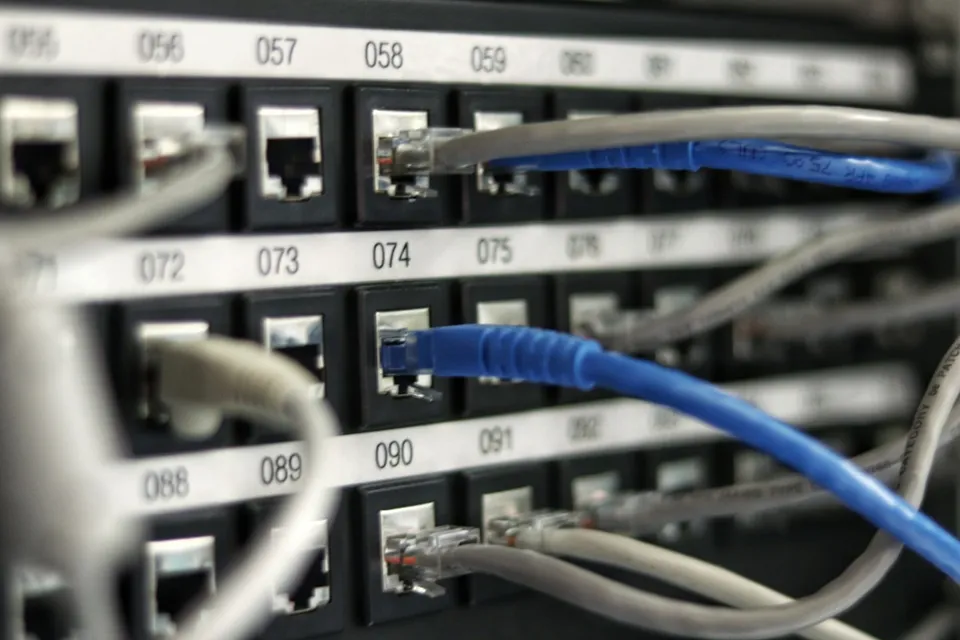
A “drop” is one cable run from the telecom room to a workstation location. It includes:
- The cable itself (Cat6 or Cat6a, plenum-rated for above-ceiling runs)
- The termination at both ends (jack at the wall, patch panel in the telecom room)
- The pathway (conduit, cable tray, J-hooks, or surface raceway)
- Labeling and testing
One drop = one network connection at one desk. A typical workstation gets two drops (one for the computer, one for the VoIP phone). A conference room table might get four to six drops. A wireless access point in the ceiling gets one drop. A security camera in the hallway gets one drop.
When we quote a buildout, we count drops, not square footage. A 2,000-square-foot open office with 15 desks needs more cable than a 2,000-square-foot warehouse with two workstations.
Installed Pricing for New Hampshire Office Cabling
These are installed prices from actual New Hampshire jobs. They include cable, terminations, jacks, faceplates, patch panels, labeling, testing, and labor. They do not include network switches, routers, firewalls, or UPS units — those are separate.
Standard Cat6 drop: $175–$225 per drop
This covers a single Cat6 cable from the telecom room to a workstation, terminated and tested. Price varies based on pathway difficulty. Open ceiling with cable tray is fast and cheap. Old building with plaster walls and no above-ceiling access is slow and expensive.
Cat6a drop (10 Gigabit ready): $225–$300 per drop
Cat6a supports 10 Gigabit Ethernet up to 100 meters. We recommend this for server rooms, conference rooms, and any location that might need high bandwidth in the future. The cable is thicker and harder to terminate, which adds labor cost.
Fiber optic backbone (per strand): $8–$15 per foot installed
When connecting telecom rooms on different floors or in different buildings, fiber is the right choice. A 100-foot run of 6-strand single-mode fiber between a first-floor server room and a second-floor IDF closet costs roughly $800–$1,500 installed, including termination and testing.
Patch panel (24-port): $150–$250 installed
Every cable run terminates at a patch panel in the telecom room. A 24-port Cat6 patch panel with terminations and labeling runs $150–$250. Larger 48-port panels scale proportionally.
Wall-mounted rack: $300–$600 installed
Small offices can use a wall-mounted bracket for a patch panel and switch. Larger installations need a floor rack. A basic 6U wall rack with mounting hardware and grounding runs $300–$600.
What a Typical Office Buildout Costs
Here are real scenarios from New Hampshire jobs:
Small office (8–12 workstations): $3,500–$6,000
12 dual drops (24 cables total), 2 wireless access point drops, 1 conference room with 4 drops, 24-port patch panel, wall-mounted rack. Common for insurance agencies, accounting firms, and small professional offices in Concord and Keene.
Mid-size office (20–30 workstations): $8,000–$15,000
30 dual drops (60 cables), 4 AP drops, 2 conference rooms, reception desk, 48-port patch panel, floor rack, cable management. Typical for law firms, medical practices, and mid-size businesses in Manchester and Nashua.
Large office (50+ workstations): $18,000–$35,000
50+ dual drops, multiple IDF closets with fiber backbone between them, server room buildout, multiple patch panels, floor racks, structured cable management. Used by corporate offices, call centers, and multi-floor tenants in larger NH commercial buildings.
Warehouse/manufacturing (varies widely): $5,000–$25,000
Warehouse cabling is unpredictable. High ceilings mean lifts. Concrete walls mean surface-mount conduit. Dusty environments mean sealed enclosures. A 20-drop warehouse might cost more than a 40-drop office because every run takes three times as long.
The Hidden Costs Nobody Mentions
Fire stopping. When you run cable through fire-rated walls, every penetration needs fire caulk or putty to restore the fire rating. Building inspectors check this. A large buildout can have 30–50 penetrations. Fire stopping adds $500–$1,500 to a typical job.
Plenum vs non-plenum cable. Above-ceiling spaces that handle air circulation require plenum-rated cable. Plenum cable costs about 30% more than standard riser cable. Using the wrong type fails inspection and creates a fire hazard. We default to plenum for commercial work unless the pathway is entirely in conduit.
Old building surprises. A Portsmouth historic building had asbestos in the ceiling tiles. Work stopped for two weeks while an abatement crew handled it. A Nashua office had knob-and-tube wiring still active above the drop ceiling. A Keene building had no above-ceiling access at all — every run went through surface raceway at triple the labor cost.
We cannot predict these during a phone estimate. A site survey catches most of them. Some only reveal themselves when we open the ceiling.
Patch cables. The cables from the wall jack to the computer. These are not part of the structured cabling quote but you need them. Budget $5–$10 per patch cable. A 25-workstation office needs 50+ patch cables (computer + phone at each desk). That is $250–$500 in cables most people forget.
Cat5e vs Cat6 vs Cat6a: What to Install in 2026
Cat5e: Still works for gigabit Ethernet. Still in millions of offices. We do not install it in new buildouts. The price difference between Cat5e and Cat6 is about $20 per drop. Saving $400 on a 20-drop office to install last-generation cable is false economy.
Cat6: The standard for new commercial installations. Supports gigabit Ethernet to 100 meters and 10 Gigabit to 55 meters. Handles PoE (Power over Ethernet) for phones, cameras, and access points. This is what we install in 90% of new buildouts.
Cat6a: The future-proof choice. 10 Gigabit to 100 meters. Better shielding against interference. Required for HDBaseT video distribution and some AV systems. We recommend Cat6a for server rooms, conference rooms, and any location where bandwidth demand will grow.
For most NH offices, Cat6 to workstations with Cat6a to key locations is the practical balance of cost and longevity.
Why Cheap Cabling Fails
We replaced a cabling job in a Bedford office last year. The previous installer used copper-clad aluminum (CCA) cable instead of solid copper. CCA is cheaper but brittle, higher resistance, and not rated for PoE. After two years, connections started dropping randomly. Cameras went offline. Phones rebooted mid-call.
The fix required re-pulling 38 drops. Cost: $8,200. The original CCA install had saved about $600 in materials.
Other shortcuts we see:
- Cable not labeled at either end (tracing a problem takes hours instead of minutes)
- Jacks punched down with a screwdriver instead of a punchdown tool (connections fail intermittently)
- No cable certification testing (you do not know if the run actually meets spec)
- Cable run parallel to fluorescent lighting ballasts (interference on every call)
- Excess cable coiled in the ceiling instead of cut to length (signal degradation)
Cabling is not a commodity. The difference between a $175 drop and a $100 drop is usually the difference between a certified installation that works for 15 years and a handyman job that causes problems within two.
Planning Your Buildout Timeline
Cabling should happen after framing and drywall but before furniture moves in. The ideal sequence:
- Space is empty. We walk it with you and mark every drop location on the floor plan.
- Pathways go in. Cable tray, J-hooks, conduit, sleeves through walls.
- Cable is pulled. All drops run from telecom room to each location.
- Terminations and testing. Every drop terminated, labeled, and certified.
- Patch panels and rack. Equipment mounted in the telecom room.
- Furniture arrives. Desks go over the floor boxes or wall jacks we installed.
- Patch cables connect. Computers and phones plug in and work.
A 25-drop office takes 3–5 working days for steps 1–5. Larger buildouts scale proportionally. Rush jobs cost more because we pull additional technicians from scheduled work.
Questions We Get Before Every Buildout
Can you work evenings and weekends?
Yes. For occupied offices, we schedule cabling after business hours to avoid disrupting your staff. The labor rate is higher for off-hours work, typically 1.5x.
Do I need two drops per desk?
If you use VoIP phones, yes. The phone needs its own network connection. Daisy-chaining the computer through the phone works technically but creates a single point of failure and limits speed. Two dedicated drops is the professional standard.
What about wireless? Do I still need cables?
WiFi access points need cables. Your server needs cables. Your security cameras need cables. Wireless is an access layer, not a replacement for structured cabling. Every wireless device ultimately connects to a wired network somewhere. Skip the cabling and you skip the foundation.
How long does cabling last?
Properly installed Cat6 cable lasts 15–20 years. The cable itself rarely fails. What changes is the equipment connected to it. The Cat5e we installed in 2005 is still carrying gigabit traffic today. The Cat6 we install now will support your network through multiple hardware refresh cycles.
Getting a Real Quote
Online cabling calculators give you a number based on square footage. They are wrong about half the time. A real quote requires walking the space.
Contact Arcomm at (603) 464-4600 or request a site survey for a fixed-price cabling proposal. We will walk your space, count the drops, check the pathways, and deliver a number you can take to your lease negotiation or buildout budget.
We have been installing network infrastructure in New Hampshire since 1985. We have wired everything from two-desk insurance offices in Hillsborough to 200-drop school buildings in Manchester. The cable in your walls is the one part of your technology stack you do not want to replace in five years. Do it once, do it right.
For more about our cabling services, see our network cabling installation in New Hampshire page.
Need help with this?
Arcomm has been installing and servicing commercial security and IT systems in New Hampshire since 1985. We'll tell you honestly what fits your building and budget.
Request a Consultation